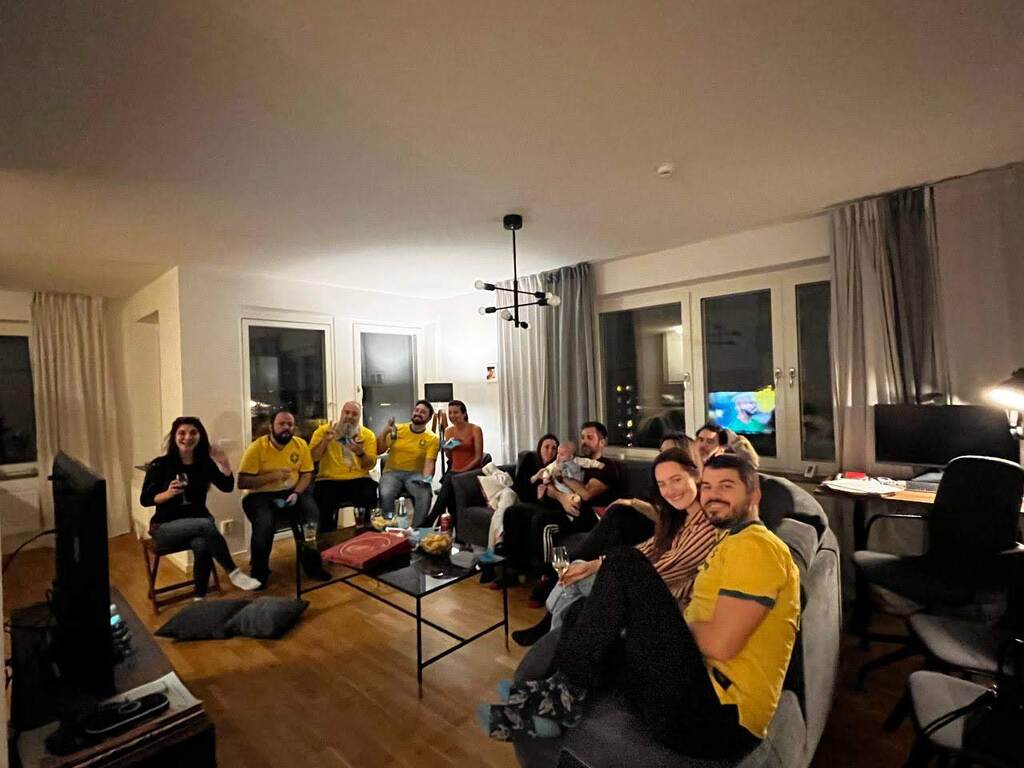

Quando escrevi o artigo Shell é lento? python teve uma performance miserável. Pra não chamar de outra coisa.
Resolvi então dar uma revisitada no teste e rodando o python3.13. A cada versão de python dizem que a performance é melhorada. Nada melhor que tirar a prova. E além disso a versão 3.13 permite desabilitar o GIL, o Global Interpreter Locker. Não se se faz alguma diferença num teste desses, mas vamos tentar.
Eu mantive o mesmo programa que rodei da outra vez:
#! /usr/bin/env python3

for i in range(20000000):
    with open("arq-python3", "w") as fd:
        None
E o resultado:
helio@goosfraba❯ time python3.13 20M-touch.py

________________________________________________________
Executed in  621.80 secs    fish           external
   usr time  384.60 secs  998.00 micros  384.60 secs
   sys time  229.78 secs    0.00 micros  229.78 secs
Demorou mais que o teste anterior. Se antes foi miserável, essa aqui... Mas antes de botar a culpa no Python, vamos rodar a versão em Go e olhar se os tempos mudaram. O código de Go também continua o mesmo:
package main

import (
        "log"
        "os"
)

func main() {
        for i := 0; i < 20000000; i++ {
                fd, err := os.Create("arq-go")
                fd.Close()
                if err != nil {
                        log.Fatal(err)
                }
        }
}
E depois daquela compilada básica:
helio@goosfraba❯ go build -o 20M-touch 20M-touch.go
helio@goosfraba❯ time ./20M-touch

________________________________________________________
Executed in  295.12 secs    fish           external
   usr time   88.50 secs    0.20 millis   88.50 secs
   sys time  199.48 secs    1.03 millis  199.47 secs
Realmente baixou o Exu-tranca-sistema no HDD. Da época em que fiz o primeiro teste pra cá a mudança foi a adição de um disco extra de 12 TB. E afetou bastante a performance. De 148s pra 295s com o binário em Go. Nesse caso é melhor rodar o este com cada linguagem pra ver as diferenças no sistema novo e ter um equilíbrio maior entre os resultados.
helio@goosfraba❯ time perl 20M-touch.pl

________________________________________________________
Executed in  260.95 secs    fish           external
   usr time   61.45 secs    1.31 millis   61.45 secs
   sys time  195.20 secs    0.04 millis  195.20 secs

helio@goosfraba❯ time bash 20M-touch.sh

________________________________________________________
Executed in  443.89 secs    fish           external
   usr time  213.20 secs    1.26 millis  213.20 secs
   sys time  227.43 secs    0.04 millis  227.43 secs
E pra melhorar o escope de testes, adicionei ainda a versão em C++:
#include <iostream>
#include <fstream>
using namespace std;

int main() {
  for (int i=0;i<20000000;i++) {
    ofstream MyFile("arq-cpp");
    MyFile.close();
  }
}
O resultado:
helio@goosfraba❯ time ./20M-touch-cpp

________________________________________________________
Executed in  205.39 secs    fish           external
   usr time   39.56 secs  359.00 micros   39.56 secs
   sys time  163.64 secs  911.00 micros  163.64 secs
O resultados foram então (do mais rápido pro mais lento):
Enquanto C++ manteve a performance esperada, perl deu um show. Eu pessoalmente achei que Go! ficou devendo, ainda mais se comparado com C++. Mas python... python fracassou miseravelmente. E de novo.
E fui tentar rodar com o GIL desabilitado e...
helio@goosfraba❯ time env PYTHON_GIL=0 python3.13 20M-touch.py
Fatal Python error: config_read_gil: Disabling the GIL is not supported by this build
Python runtime state: preinitialized


________________________________________________________
Executed in    4.91 millis    fish           external
   usr time    2.03 millis    1.09 millis    0.95 millis
   sys time    2.85 millis    0.02 millis    2.83 millis
Vou precisar compilar um python3.13 com a configuração que permite desabilitar o GIL...
Update: compilei um pacote do AUR.
==> Creating package "python313-freethreaded"...
  -> Generating .PKGINFO file...
  -> Generating .BUILDINFO file...
  -> Generating .MTREE file...
  -> Compressing package...
==> Leaving fakeroot environment.
==> Finished making: python313-freethreaded 3.13.3-1 (Mon 12 May 2025 06:04:15 PM CEST)
==> Cleaning up...
E vamos aos resultados:
helio@goosfraba❯ time env PYTHON_GIL=0 python3.13t 20M-touch.py

________________________________________________________
Executed in   31.58 mins    fish           external
   usr time   14.01 mins    0.00 millis   14.01 mins
   sys time   17.25 mins    1.96 millis   17.25 mins
Python continua parecendo que bateu uma feijuca antes de rodar os testes. Não que remover o GIL fosse mudar muita coisa uma vez que o teste é sequencial. Mas podia ter melhorado um pouco.
Enquanto isso também descobri o porquê dos testes estarem mais lentos: tem algum treco do yay compilando. Sei lá eu o que é uma vez que estou conectado remotamente.

Sempre tenho renovado meus votos sobre o ano do Linux no desktop. E parece que dessa vez deu certo mesmo.
Sem nenhuma ligação com comunidades Linux ou software livre, o influenciador digital "PewDiePie", com milhões de seguidores, simplemente resolveu migrar e enaltecer o uso do Linux. E não pense que foi pouca coisa. O cara já meteu uma variante do archlinux com hyperland.
Simplesmente maravilhoso. Confira:
Se ainda existisse FISL, era certeza que o PewDiePie era o próximo keynote. Quem sabe não seja no FOSDEM?
A querida Bárbara Tostes lançou esse vídeo anunciando seu novo canal e o trabalho que irá fazer por lá. Então aqui está minha contribuição em sua divulgação.
E boa sorte para ela.

Só um comando que uso bastante e provavelmente tem gente que nem sabe que existe.
OpenSSL tem várias funcionalidades, entre elas gerar senhas. O comando que uso é o seguinte:
❯ openssl rand -base64 32 | cut -c 1-43
O resultado é algo como isso aqui (que a cada comando resulta em algo aleatório):
❯ openssl rand -base64 32 | cut -c 1-43
EHjsiO2IIuaBzGmugiVDZgfmj83v/LqZ/nevZ5itzV0
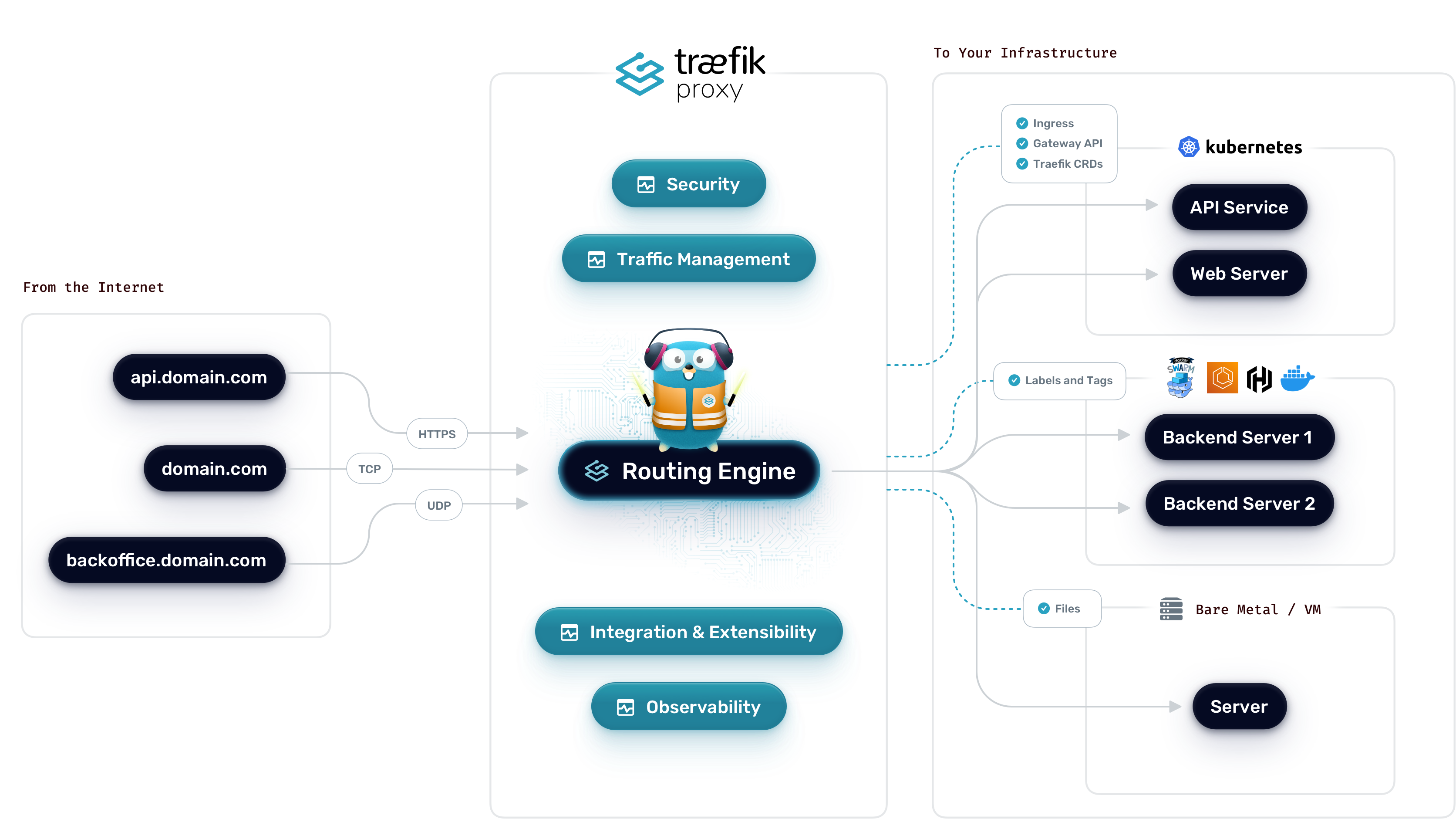
Esse parece ser um tópico um tanto quanto... distópico? Talvez nem tanto. Mas todas as referências sobre o assunto na Internet estão incompletos e geralmente são pra versões mais antigas do traefik. Traefik é um roteador de conexões que funciona tanto como programa chamado por systemd (ou outro sistema de init se for um BSD), ou por container com algo como docker-compose, ou ainda diretamente em kubernetes. E não só funciona como proxy-reverse: pode também atuar como um servidor http pra suas conexões. E não somente tcp como udp. E escrito em Go!
Eu precisei colocar um servidor ssh atrás de um traefik. E deu um certo trabalho. Pra testar e mostrar aqui também, usei docker-compose pro serviço. Isso facilitou a configuração. Pra backend com ssh, subi uma instância do gitea com o ssh na porta 2222. Usei também certificados letsencrypt nas portas https do serviço.
Como um plus, ainda adicionei um allowlist pra acessar o serviço somente de certos IPs.
Vamos pra configuração então. Primeiramente do traefik.
Pra subir, eu configurei pra ouvir nas portas 80 (http), 443 (https), 8080 (traefik dashboard) e 2222 (ssh).
O conteúdo de traefik/docker-compose.yml:
services:
  traefik:
    image: "traefik:v3.3"
    container_name: "traefik"
    restart: unless-stopped
    environment:
      - TZ=Europe/Stockholm
    ports:
      - "80:80"
      - "443:443"
      - "8080:8080"
      - "2222:2222"
    volumes:
      - "./letsencrypt:/letsencrypt"
      - "/var/run/docker.sock:/var/run/docker.sock:ro"
      - "./traefik.yml:/traefik.yml:ro"
    networks:
      - traefik

networks:
  traefik:
    name: traefik
Junto com essa configuração de container, ainda inclui a configuração do serviço em traefik/traefik.yml:
api:
  dashboard: true
  insecure: true
  debug: true
entryPoints:
  web:
    address: ":80"
    http:
      redirections:
        entryPoint:
          to: websecure
          scheme: https
  websecure:
    address: ":443"
  ssh:
    address: ":2222"
serversTransport:
  insecureSkipVerify: true
providers:
  docker:
    endpoint: "unix:///var/run/docker.sock"
    exposedByDefault: false
    network: traefik
certificatesResolvers:
  letsencrypt:
    acme:
      email: This email address is being protected from spambots. You need JavaScript enabled to view it.
      storage: /letsencrypt/acme.json
      httpChallenge:
        # used during the challenge
        entryPoint: web

log:
  level: WARN
Aqui é possível ver que defino novamente os entrypoints pra 80, 443 e 2222. E no 80 (http) eu redireciono pro 443 (https). E certificado do letsencrypt.
Tudo pronto no lado do traefik. Agora é o ponto de subir o serviço e preparar algumas coisas pra testar.
# docker compose -p traefik -f traefik/docker-compose.yml up -d
[+] Running 1/1
 ✔ Container traefik  Started                                0.4s
Dentro do diretório traefik será criado um diretório letsencrypt e dentro dele terá o arquivo acme.json com seus certificados.
Primeiramente vamos subir um container de teste pra ver se tudo funciona.
O próprio projeto traefik fornece um container chamado whoami pra isso.
O conteúdo de whois/docker-compose.yml:
services:
  whoami:
    container_name: simple-service
    image: traefik/whoami
    labels:
        - "traefik.enable=true"
        - "traefik.http.routers.whoami.rule=Host(`whoami.tests.loureiro.eng.br`)"
        - "traefik.http.routers.whoami.entrypoints=websecure"
        - "traefik.http.routers.whoami.tls=true"
        - "traefik.http.routers.whoami.tls.certresolver=letsencrypt"
        - "traefik.http.services.whoami.loadbalancer.server.port=80"
    networks:
        - traefik
networks:
  traefik:
    name: traefik
E habilitando o serviço com docker-compose:
# docker compose -p whoami -f whoami/docker-compose.yml up -d
WARN[0000] a network with name traefik exists but was not created for project "whoami".
Set `external: true` to use an existing network
[+] Running 1/1
 ✔ Container simple-service  Started                                              0.3s
E um simples teste do serviço:
❯ curl -I http://whoami.tests.loureiro.eng.br
HTTP/1.1 308 Permanent Redirect
Location: https://whoami.tests.loureiro.eng.br/
Date: Thu, 24 Apr 2025 12:43:55 GMT
Content-Length: 18

❯ curl  https://whoami.tests.loureiro.eng.br
Hostname: 0da540e1039c
IP: 127.0.0.1
IP: ::1
IP: 172.18.0.3
RemoteAddr: 172.18.0.2:52686
GET / HTTP/1.1
Host: whoami.tests.loureiro.eng.br
User-Agent: curl/8.5.0
Accept: */*
Accept-Encoding: gzip
X-Forwarded-For: 1.2.3.4
X-Forwarded-Host: whoami.tests.loureiro.eng.br
X-Forwarded-Port: 443
X-Forwarded-Proto: https
X-Forwarded-Server: 4cacedb0129a
X-Real-Ip: 1.2.3.4
O primeiro curl pro endpoint na porta 80 (http) recebe um redirect pra https.
Perfeito!
O segundo, os dados do container de forma transparente.
O serviço funciona! Mas pra http e https. Falta ssh na porta 2222, que está nessa porta pra não atrapalhar o uso do ssh normal do sistema.
Pra isso eu configurei um gitea, como descrevi no início do artigo.
Seu docker-compose.yml é o seguinte:
    services:
  server:
    image: gitea/gitea:1.23-rootless #latest-rootless
    container_name: gitea
    environment:
     - GITEA__database__DB_TYPE=postgres
     - GITEA__database__HOST=db:5432
     - GITEA__database__NAME=gitea
     - GITEA__database__USER=gitea
     - GITEA__database__PASSWD=A4COU5a6JF5ZvWoSufi0L1aomSkzqww7s1wv039qy6o=
     - LOCAL_ROOT_URL=https://gitea.tests.loureiro.eng.br
     - GITEA__openid__ENABLE_OPENID_SIGNIN=false
     - GITEA__openid__ENABLE_OPENID_SIGNUP=false
     - GITEA__service__DISABLE_REGISTRATION=true
     - GITEA__service__SHOW_REGISTRATION_BUTTON=false
     - GITEA__server__SSH_DOMAIN=gitea.tests.loureiro.eng.br
     - GITEA__server__START_SSH_SERVER=true
     - GITEA__server__DISABLE_SSH=false
    restart: always
    volumes:
      - gitea-data:/var/lib/gitea
      - gitea-config:/etc/gitea
      - /etc/timezone:/etc/timezone:ro
      - /etc/localtime:/etc/localtime:ro
    #ports:
    #  - "127.0.0.1:3000:3000"
    #  - "127.0.0.1:2222:2222"
    depends_on:
      - db
    networks:
      - traefik
    labels:
      - "traefik.enable=true"
      - "traefik.http.routers.giteaweb.rule=Host(`gitea.tests.loureiro.eng.br`)"
      - "traefik.http.routers.giteaweb.entrypoints=websecure"
      - "traefik.http.routers.giteaweb.tls=true"
      - "traefik.http.routers.giteaweb.tls.certresolver=letsencrypt"
      - "traefik.http.services.giteaweb.loadbalancer.server.port=3000"
      - "traefik.http.middlewares.giteaweb-ipwhitelist.ipallowlist.sourcerange=1.2.3.4, 4.5.6.7"
      - "traefik.http.routers.giteaweb.middlewares=giteaweb-ipwhitelist"
      - "traefik.tcp.routers.gitea-ssh.rule=HostSNI(`*`)"
      - "traefik.tcp.routers.gitea-ssh.entrypoints=ssh"
      - "traefik.tcp.routers.gitea-ssh.service=gitea-ssh-svc"
      - "traefik.tcp.services.gitea-ssh-svc.loadbalancer.server.port=2222"
      - "traefik.tcp.middlewares.giteassh-ipwhitelist.ipallowlist.sourcerange=1.2.3.4, 4.5.6.7"
      - "traefik.tcp.routers.gitea-ssh.middlewares=giteassh-ipwhitelist"

  db:
    image: postgres:17
    restart: always
    container_name: gitea_db
    environment:
      - POSTGRES_DB=gitea
      - POSTGRES_USER=gitea
      - POSTGRES_PASSWORD=A4COU5a6JF5ZvWoSufi0L1aomSkzqww7s1wv039qy6o=

    networks:
      - traefik
    volumes:
      - gitea-db:/var/lib/postgresql/data

networks:
  traefik:
    name: traefik

volumes:
  gitea-data:
  gitea-config:
  gitea-db:
Pode ser visto que existe uma regra pra parte web, que roda na porta 3000 do container, e pra parte de ssh, que fica na porta 22222. Eu deixei comentado a parte que exporta as portas pra mostrar claramente que isso não é necessário. Aliás não funciona se especificar as portas.
E finalmente rodando o serviço:
# docker compose -p gitea -f gitea/docker-compose.yml up -d
WARN[0000] a network with name traefik exists but was not created for project "gitea".
Set `external: true` to use an existing network
[+] Running 2/2
 ✔ Container gitea_db  Started                   0.3s
 ✔ Container gitea     Started                   1.0s
E vamos ao testes.
❯ curl -s  https://gitea.tests.loureiro.eng.br | head -n 10
<!DOCTYPE html>
<html lang="en-US" data-theme="gitea-auto">
<head>
        <meta name="viewport" content="width=device-width, initial-scale=1">
        <title>Gitea: Git with a cup of tea</title>
        <link rel="manifest" href="data:application/json;base64,eyJuYW1lIjoiR2l0ZWE6IEdpdCB3aXRoIGEgY3VwIG9mIHRlYSIsInNob3J0X25hbWUiOiJHaXRlYTogR2l0IHdpdGggYSBjdXAgb2YgdGVhIiwic3RhcnRfdXJsIjoiaHR0cDovL2xvY2FsaG9zdDozMDAwLyIsImljb25zIjpbeyJzcmMiOiJodHRwOi8vbG9jYWxob3N0OjMwMDAvYXNzZXRzL2ltZy9sb2dvLnBuZyIsInR5cGUiOiJpbWFnZS9wbmciLCJzaXplcyI6IjUxMng1MTIifSx7InNyYyI6Imh0dHA6Ly9sb2NhbGhvc3Q6MzAwMC9hc3NldHMvaW1nL2xvZ28uc3ZnIiwidHlwZSI6ImltYWdlL3N2Zyt4bWwiLCJzaXplcyI6IjUxMng1MTIifV19">
        <meta name="author" content="Gitea - Git with a cup of tea">
        <meta name="description" content="Gitea (Git with a cup of tea) is a painless self-hosted Git service written in Go">
        <meta name="keywords" content="go,git,self-hosted,gitea">
        <meta name="referrer" content="no-referrer">
❯ telnet gitea.tests.loureiro.eng.br 2222
Trying 1.2.3.4...
Connected to gitea.tests.loureiro.eng.br.
Escape character is '^]'.
SSH-2.0-Go

^]
telnet> q
Connection closed.
E pronto! Temos o serviço funcionando e roteado pelo traefik. E podendo fazer ACL de ip do serviço sem precisar do firewall pra isso.
Boa diversão!
Nota: eu coloquei um básico da configuração do gitea pra exemplo. E não funciona se copiar e colar. Pra ter um serviço rodando, terá de adicionar mais algumas partes em environment.
Continuando os trabalhos do artigo Ferramenta pra verificar quantidades de dias válidos de um certificado do letsencrypt, fiz uma pequena entrada na crontab pra chamar um script que fiz em fish.
# tail -1 /etc/crontab
0  1  */5 * * root /root/bin/check-domain-expiration-dates.fish >> /tmp/certificate_renew.log 2>&1
E o respectivo script:
#! /usr/bin/env fish
set EXPIRATION_DAYS 10

for info in (letsencrypt-cert-days)
  set domain (echo $info | cut -d"=" -f1)
  set days (echo $info | cut -d"=" -f2)
  if [ $days -lt $EXPIRATION_DAYS ]
    echo "Renewing domain: $domain"
    certbot renew -d $domain
  end
end
Então eu rodo no crontab a cada 5 dias pra detectar se algum certificado está expirando. E então chamo o `certbot` pra renovar se for o caso.
Funciona? Não sei. Meus certificados estão válidos ainda por quase 50 dias. Daqui um mês eu atualizo se funcionou.
# letsencrypt-cert-days --domain=helio.loureiro.eng.br
helio.loureiro.eng.br=48
.oO(nota mental: trocar crontab por systemd-timer)
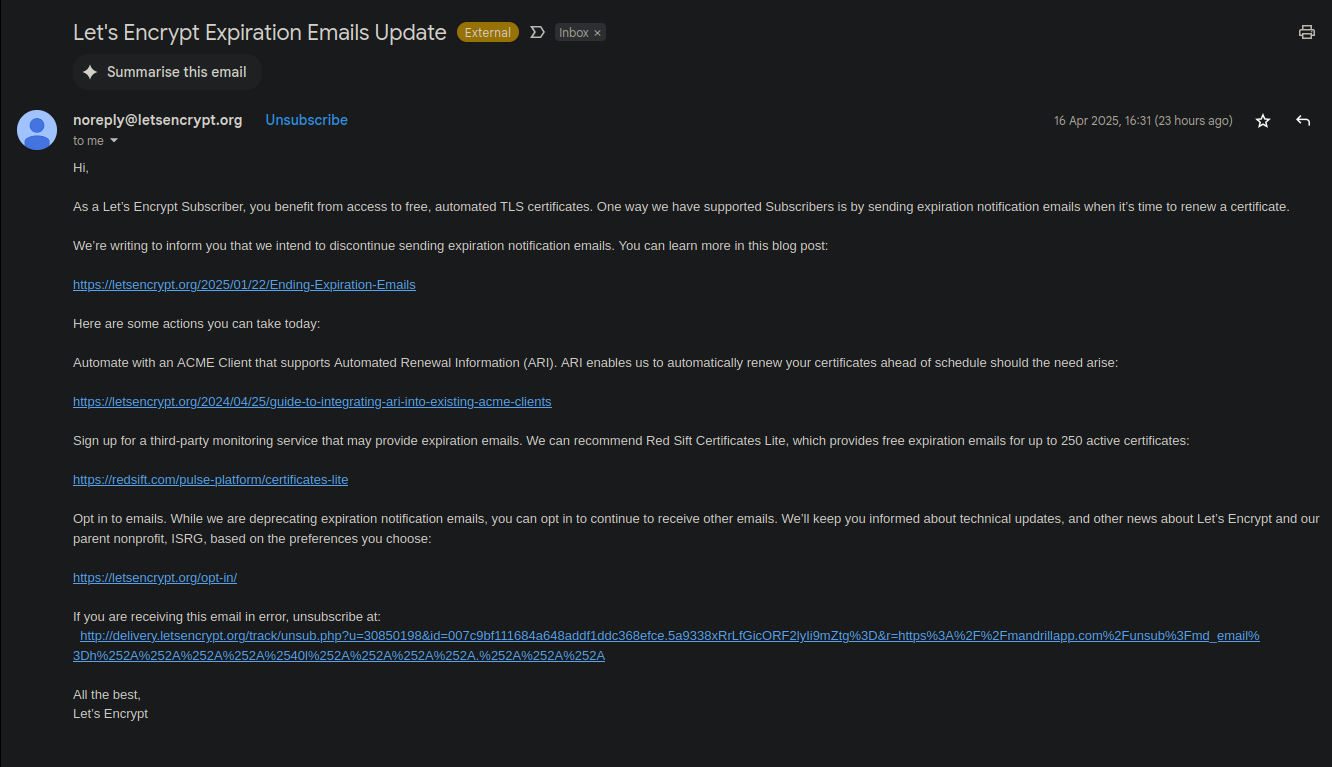
Já faz algum tempo que venho recebendo esses emails do letsencrypt avisando que as notificações de certificados expirados enviados por email serão suspensas. Até aí ok. Imagino que isso consuma um volume razoável de banda da organização, sem falar nos problemas de antispam por aí.
O problema é que enquanto eles param esse serviço, ao mesmo tempo não fornecem uma ferramenta fácil pra olhar quando certificado irá expirar. Claro que é possível fazer isso usando o openssl:
❯ openssl x509 -dates -noout -in /etc/letsencrypt/live/helio.loureiro.eng.br/cert.pem
notBefore=Mar  8 17:32:15 2025 GMT
notAfter=Jun  6 17:32:14 2025 GMT
O problema é que não é possível fazer uma automação disso pra rodar alguma crontab e renovar os certificados em caso de expiração.
Então resolvi arregaçar as mangas e fazer alguma coisa em Go! pra resolver de vez esse problema.
$ /home/helio/bin/letsencrypt-cert-days
helio.loureiro.eng.br=50
hl.eng.br=50
linux-br.org=50
loureiro.eng.br=50
truta.org=50
O código está no GitHub.
Outro dia eu estava mexendo no meu perfil no KDE quando percebi a possibilidade de registrar as digitais pra fazer autenticação. Algo possível nos laptops da linha ThinkPad.
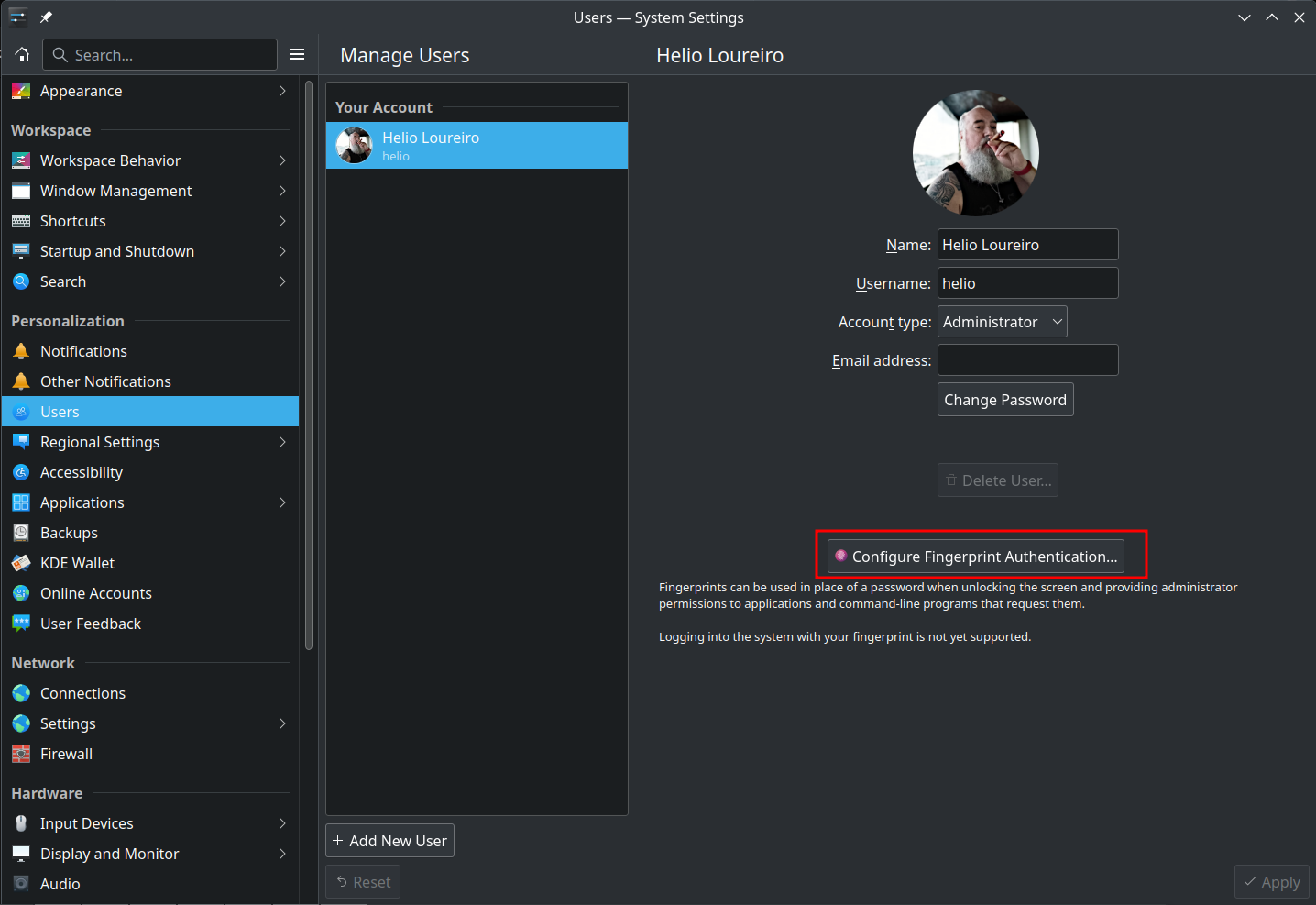
Configurei meus dois dedos indicadores e... nada. Simplesmente não funcionou.
Deixei isso pra lá. Afinal não era algo que eu queria tanto assim. Mas ficou aquele desgosto de ter falhado. E hoje eu resolvi pesquisar um pouco mais.
A dica pra resolver estava numa discussão do Linux Mint.
tl;dr: o daemon que cuida de tudo é o fingerd, que estava instalado.
Mas faltava rodar o comando pam-auth-update e selecionar pra fazer a autenticação pelas digitais.

Feito isso, a autenticação passou a funcionar tanto pra desbloquear a interface gráfica quanto pro uso do sudo.
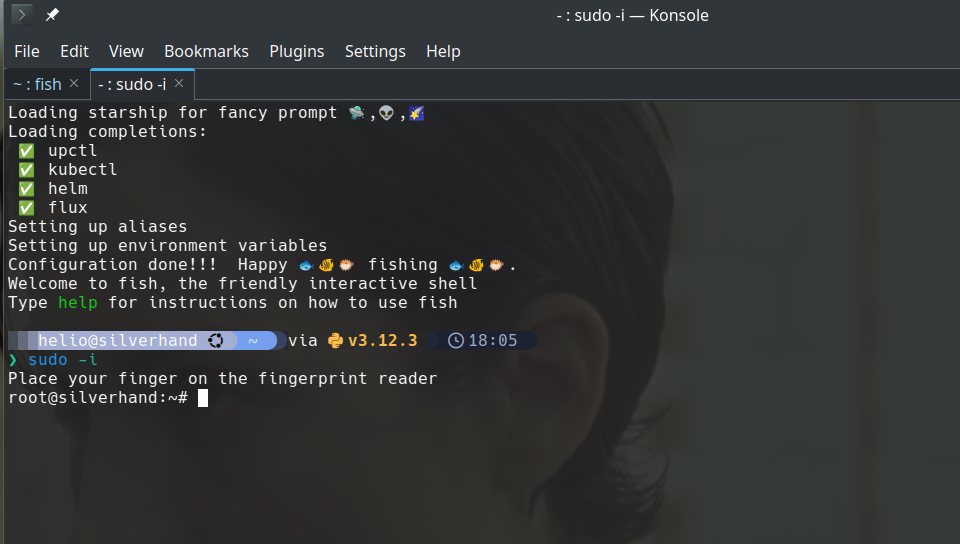
E basta um ctrl+c pra voltar pra usar a senha digitada pelo teclado.

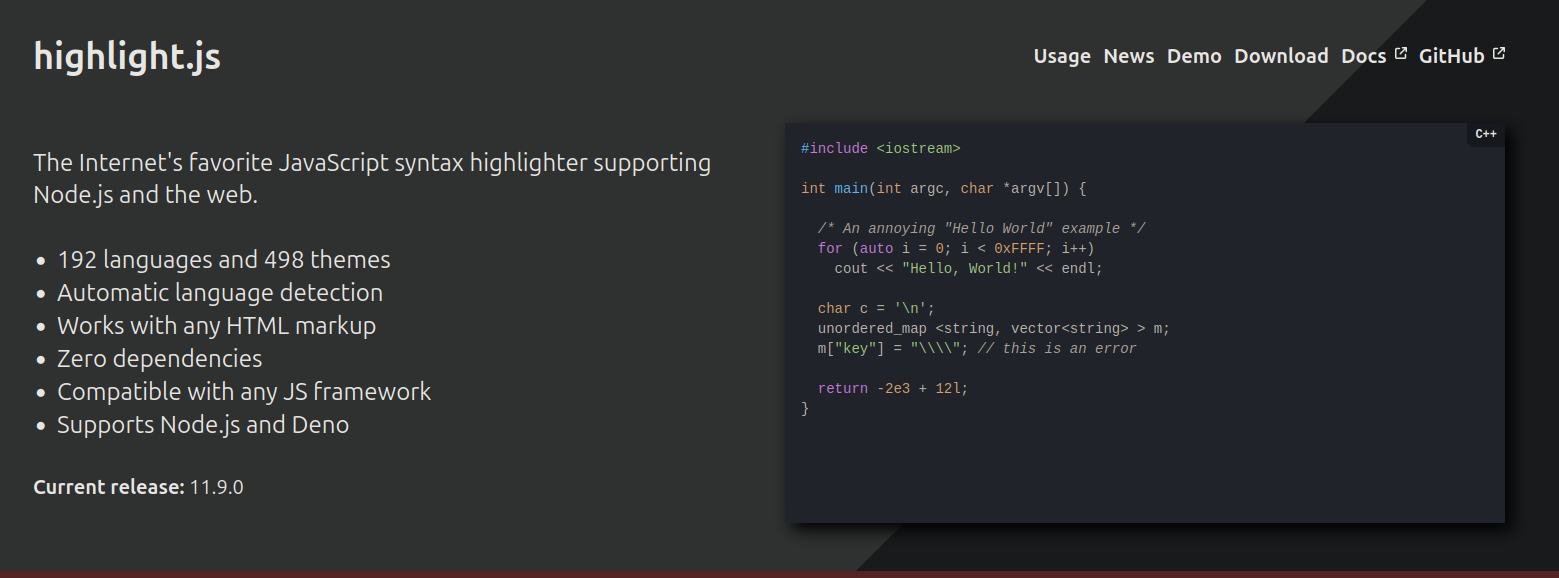
Um dia eu perguntei no grupo do Joomla no Telegram se tinha algum jeito de deixar os códigos publicados com cores, da mesma forma que vemos hoje em dia nos editores. A resposta foi "use o highlight.js".
E assim o fiz.
Não sei se configurei da melhor forma possível. Muito provavelmente não porque, cada vez que atualizo o tema, tenho de reconfigurar tudo. Mas a forma que uso é editar no tema principal o "index.php" e adicionar as seguintes linhas na parte de baixo:
  [...]
<head>
    <jdoc:include type="metas" />
    <jdoc:include type="styles" />
    <link rel="stylesheet" href="/media/templates/site/cassiopeia/css/dracula.css">
    <jdoc:include type="scripts" />
</head>
[...]
</body>
<script src="https://cdnjs.cloudflare.com/ajax/libs/highlight.js/11.9.0/highlight.min.js"></script>
<script>hljs.highlightAll();</script>
</html>
O dracula.css foi uma adição mais recente. Eu queria que o código ficasse com uma aparência de tema escuro, que é a mesma do site. Tentei usar apontando remotamente, mas como não funcionava eu acabei fazendo na força bruta: copiei e salvei dentro do diretório de css do tema.
Pra quem quiser fazer o mesmo em seu site:
Update: depois que escrevi o artigo, resolvi procurar se existe uma forma menos tosca de adicionar css e js. Não tem. Simples assim.
Essa merece o selo "pai chora no banho".


Nada muito glamoroso. Só um script usando utf-8 pra fazer uma caixinha bonitinha em volta do texto.
  #!/usr/bin/env bash

sizeof() {
    local msg="$1"
    local size=$(echo $msg | wc -L)
    # one space at beginning and other at the end
    size=$((size+2))
    echo $size
}

printchar() {
    local char="$1"
    local nr="$2"
    while [ $nr -gt 0 ]
        do
        echo -ne "$char"
        nr=$((nr-1))
    done
}


printbox() {
    local msg="$1"
    local s=$(sizeof "$msg")

    echo -n "┌"
    printchar "─" $s
    echo "┐"
    echo -e "│ ${msg} │"
    echo -n "└"
    printchar "─" $s
    echo -e "┘\n"
}

message="$@"
printbox "$message"
O código também está publicado no GitHub.
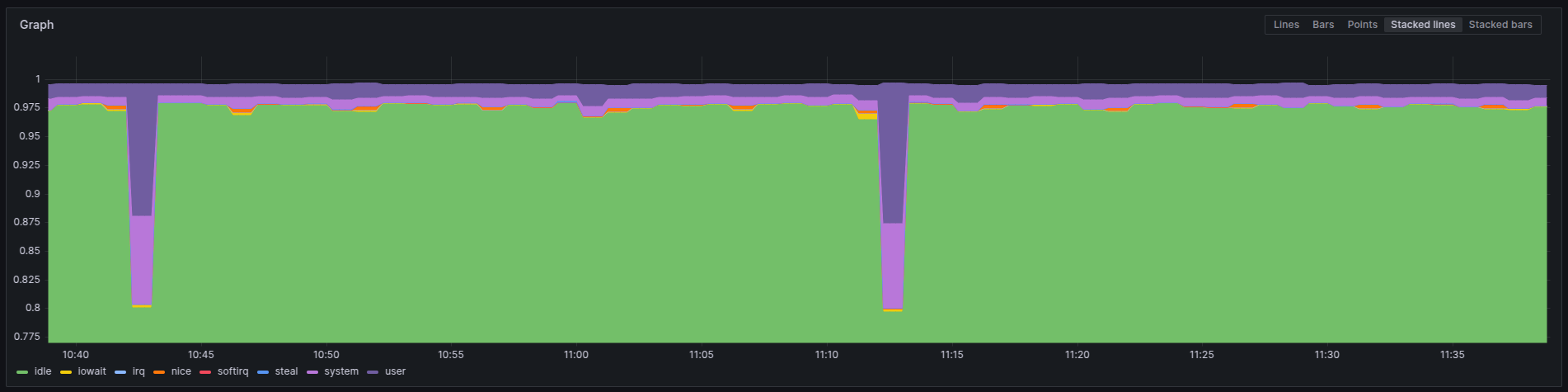
Estou inaugurando uma categoria nova, observability, ou... observabilidade na língua pátria. Nunca comentei nada por aqui, mas nos últimos anos em que trabalhei na Ericsson, o fiz dentro do time que mantinha o Prometheus. Prometheus é um conhecido sistema de monitoração dentro de clusters Kubernetes, ou k8s pros já iniciados.
Não era um trabalho glorioso que contribuia pro projeto. Não diretamente. Era mais sobre compilar a partir dos fontes com o sistema oficial da empresa, que era Suse (e talvez ainda seja) e passar por alguns testes em cima dos helm charts que construíamos. Além de algumas verificações de segurança.
Segurança aliás foi uma das poucas coisas que contribuí pro projeto open source. Reportei algumas vulnerabilidades encontradas pelos nossos scanners em alguns pacotes usados. Geralmente em javascript/npm.
O tempo passou, fui demitido, e acabei em outro emprego.
No emprego atual não existe tanta demanda assim por k8s. Até tem alguma coisa, mas o negócio mesmo gira em torno de VMs com Linux. Então nada de Prometheus pra esses casos. Mas existem alternativas. Uma delas é usar um programa "agente" rodando nessas VMs e enviar pra um "Prometheus" os dados ao invés de esperar que um Prometheus real busque o dado, como é o caso dentro de um cluster k8s.
Pra isso instalei o mimir do Grafana. Mimir, aquele deus que cortam a cabeça e Odin a preserva pra ouvir seus conselhos, funciona como um remote write de Prometheus. Em linguagem mais simples, é onde os dados ficam guardados. Um DB dos dados coletados. E é possível fazer o Grafana, aquele dos dashboards, ler esses dados dele.
Eu segui os passos de instalação em VM ao invés de usar k8s pro mimir.
É mais fácil pra gerenciar o espaço em disco e aumentar se necessário.
E também no cloud provider que usamos, custa mais barato assim.
A configuração que fiz é assim em /etc/grafana/mimir.yaml:
  multitenancy_enabled: false
no_auth_tenant: <token>

blocks_storage:
  backend: filesystem
  bucket_store:
    sync_dir: /var/mimir/tsdb-sync
  filesystem:
    dir: /var/mimir/data/tsdb
  tsdb:
    dir: /var/mimir/tsdb

compactor:
  data_dir: /var/mimir/compactor
  sharding_ring:
    kvstore:
      store: memberlist

distributor:
  ring:
    instance_addr: 127.0.0.1
    kvstore:
      store: memberlist

ingester:
  ring:
    instance_addr: 127.0.0.1
    kvstore:
      store: memberlist
    replication_factor: 1

ruler_storage:
  backend: filesystem
  filesystem:
    dir: /var/mimir/rules

server:
  http_listen_address: localhost
  http_listen_port: 9009
  log_level: warn
  grpc_server_max_recv_msg_size: 2147483647
  grpc_server_max_send_msg_size: 2147483647

store_gateway:
  sharding_ring:
    replication_factor: 1

usage_stats:
  enabled: true

limits:
  ingestion_burst_size: 3500000
  ingestion_rate: 100000
  max_global_series_per_user: 100000000
  max_label_names_per_series: 50
  max_query_parallelism: 224
  out_of_order_time_window: "5m"
Essa é a maneira mais simples possível. O token é que será usado em todo lugar pra validar as conexões. De grafana aos cliente alloy. E usando nginx pra gerenciar os certificados SSL e conectar a port 443 com a interna 9009, onde roda o mimir.
Falando dos clientes, esses eu instalei primeiro o grafana-agent, que faz a mesma coisa. Mas a página de configuração já avisava que estava defasado e que era pra migrar pro alloy. Então resolvi fazer isso logo ao invés de esperar parar de funcionar.
A primeira configuração que fiz pro grafana-agent em /etc/grafana-agent.yaml era a seguinte:
  server:
  log_level: info

metrics:
  global:
    scrape_interval: 1m
  wal_directory: '/var/lib/grafana-agent'
  configs:
    # Example Prometheus scrape configuration to scrape the agent itself for metrics.
    # This is not needed if the agent integration is enabled.
    - name: agent
      host_filter: false
      scrape_configs:
        - job_name: agent
          static_configs:
            - targets: ['localhost:9090']
          relabel_configs:
            - source_labels: [__address__]
              replacement: <nome do servidor>
              target_label: instance
              action: replace
      remote_write:
        - url: https://<endereço do mimir>/api/v1/push
          headers:
            X-Scope-OrgID: <token>

integrations:
  agent:
    enabled: true
  node_exporter:
    enabled: true
    include_exporter_metrics: true
    disable_collectors:
      - "mdadm"
É possível ver que dentro de remote_write eu coloco o endereço do mimir em url com REQUEST_URI apontando pra /api/v1/push e que adiciono um header X-Scope-OrgID com o mesmo token pra validar.
E isso funcionava.
Mas tive de mudar pro alloy. E a configuração, que usa uma sintaxe própria (e bastante bizarra), é a seguinte:
  root@heliotest1:~# cat /etc/alloy/config.alloy

    prometheus.exporter.unix "company" {
        enable_collectors = ["cpu", "disk", "filesystem", "systemd"]
        cpu  {
                guest = true
                info = true

        }
        disk { }
        filesystem {
                mount_timeout = "3s"
        }
        systemd {
                enable_restarts = true
                start_time = true
        }


}

prometheus.remote_write "production" {
        endpoint {
                url = "http://<endereço do mimir>/api/v1/push"
                headers = {
                        "X-Scope-OrgID" = "<token>",
                }
                queue_config { }
                metadata_config { }
        }
}

// Collect metrics from Kubernetes pods and send them to prod.
prometheus.scrape "first" {
        targets    = prometheus.exporter.unix.company.targets
        forward_to = [prometheus.remote_write.production.receiver]
}
Eu copiei alguns valores do manual de configuração, como o que é visto em filesystem.
Efetivamente não vi se faz muita diferença isso ou não.
Feito isso, os agentes alloy começam a enviar os dados pro mimir.
Na configuração do mimir é possível ver que eu aumentei alguns parâmetros pra aguentar a quantidade de dados recebidos como grpc_server_max_recv_msg_size/grpc_server_max_send_msg_size.
O passo final é adicionar essa origem no grafana pra gerar as dashboards. A origem tem de escolher como se fosse um prometheus.
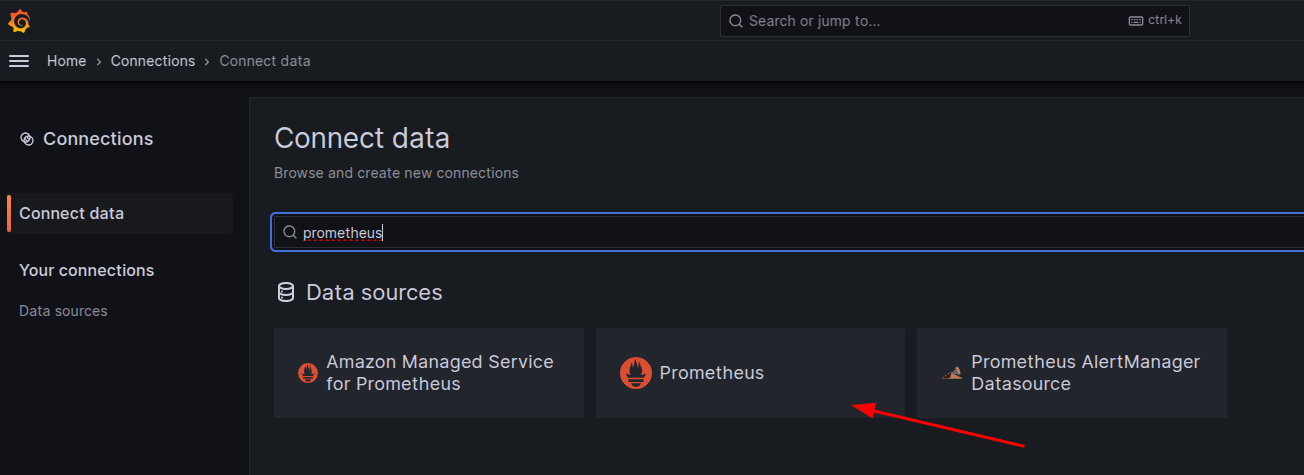
Em seguida a configuração.
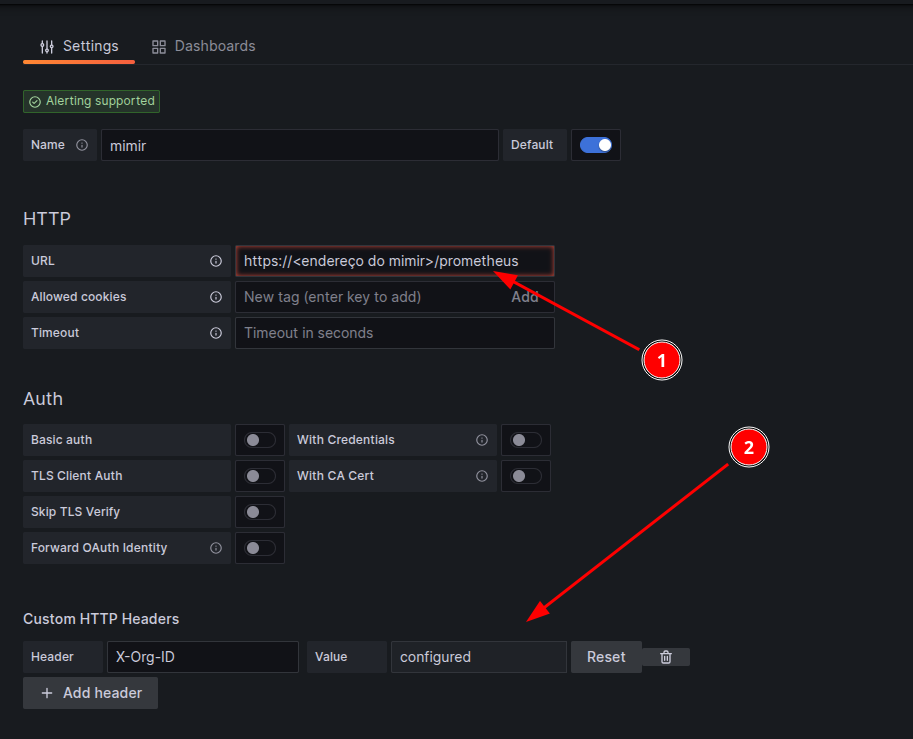
Note que o endereço do mimir [1] passa a usar a REQUEST_URI /prometheus e que o é preciso adicionar um campo de header X-Org-ID [2] onde estará o valor do token configurado no mimir. Feito isso, basta usar o mimir como se fosse um Prometheus e gerar seus dashboards.
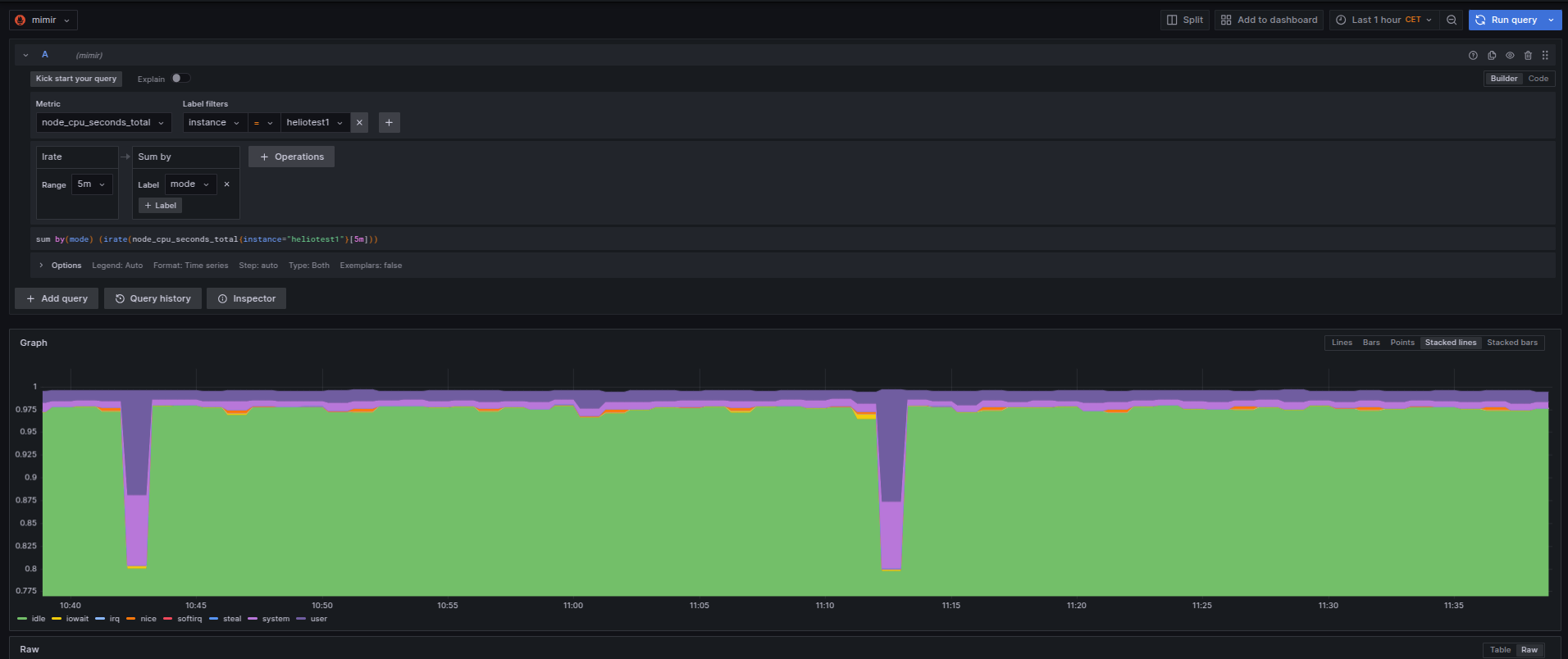
Boa diversão!
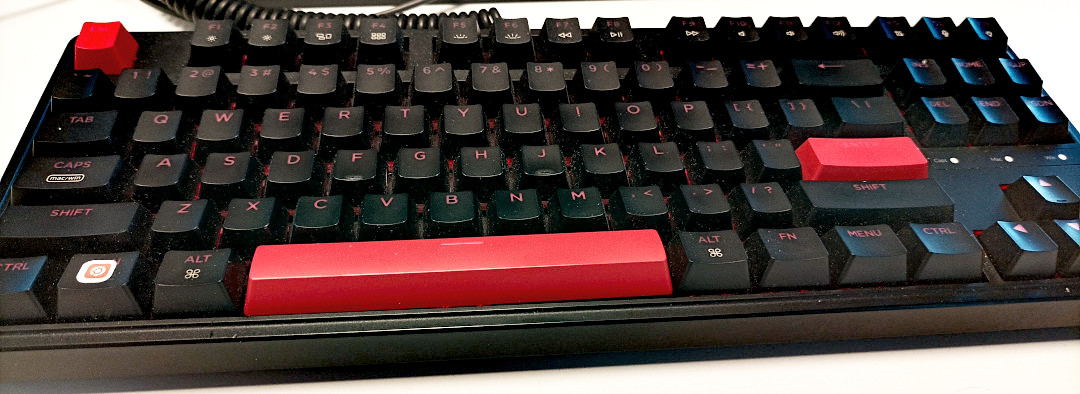
Eu já tinha comentando que uso teclados da marca Keychron no artigo trabalhando de home-office - atualização de 2021 com teclado Keychron C1, mas o que eu não tinha descrito ainda é que acabei comprando mais de 1 teclado.
Como gostei bastante do teclado com switches brown, mais macios e menos barulhentos que o blue, eu queria experimentar os red. Encontrei uma promoção do modelo K1, wireless, por 70 USD. E com switches red. Só não tinha RGB e os switches eram fixos. Se eu comprasse somente os switches, uma vez que meu teclado C1 é swappable, eu gastaria 60 USD. Então por 10 USD a mais eu teria um teclado novo. E resolvi fechar a compra.
Quando fui apertar pra comprar... aparece uma promoção de um teclado C3 com switches red por 30 USD. A mão conçou, o escorpião no bolso não ficou feliz, mas fui lá e comprei esse outro teclado com a ideia de deixar ele no trabalho. E assim foram 100 USD em teclado que eu nem precisava. Mas isso fica pra outra estória.
Quando recebi os teclados novos, coloquei o K1 em casa e deixei o C3 no trabalho. Na época estava com um laptop da Apple. E tudo funcionava sem problemas.
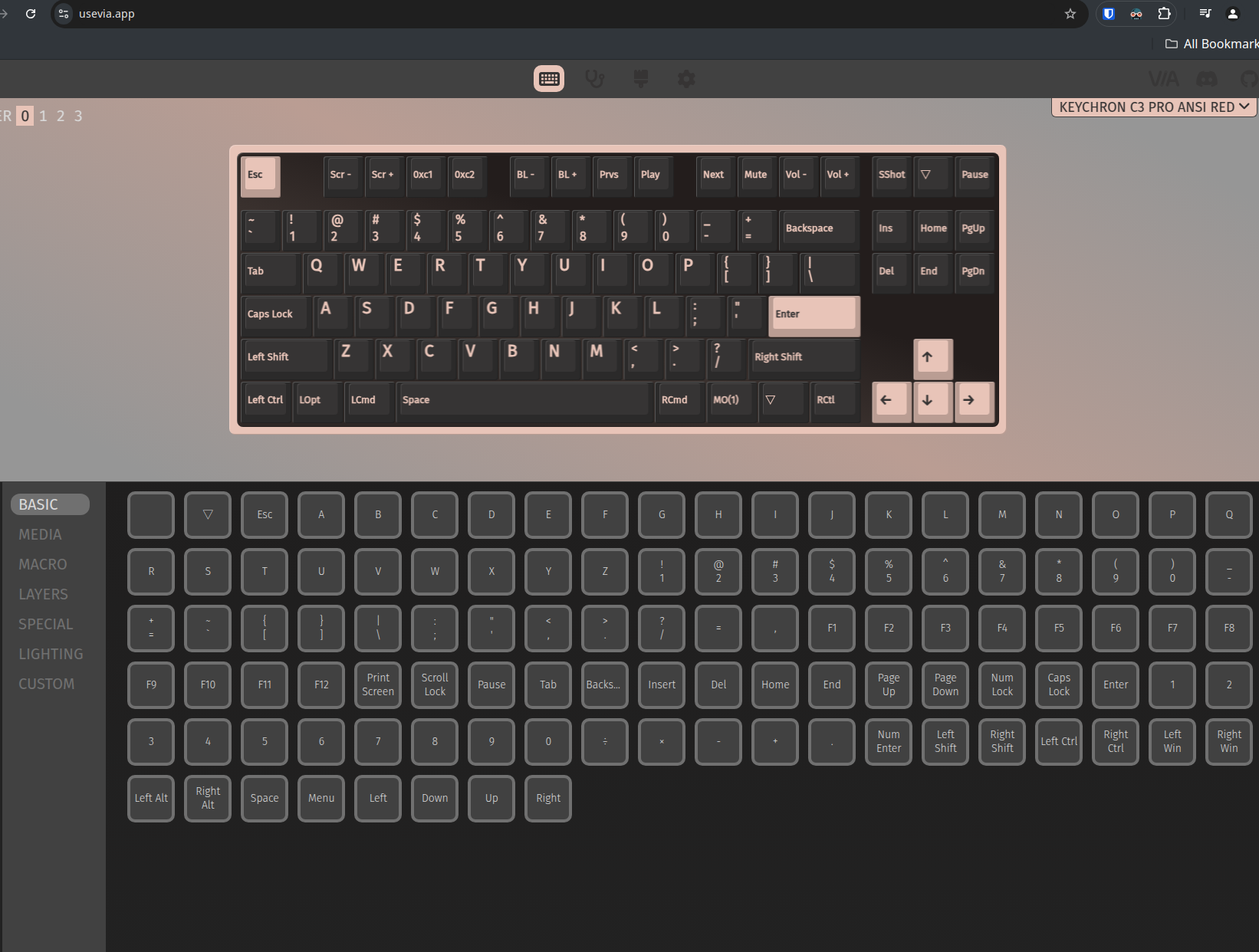
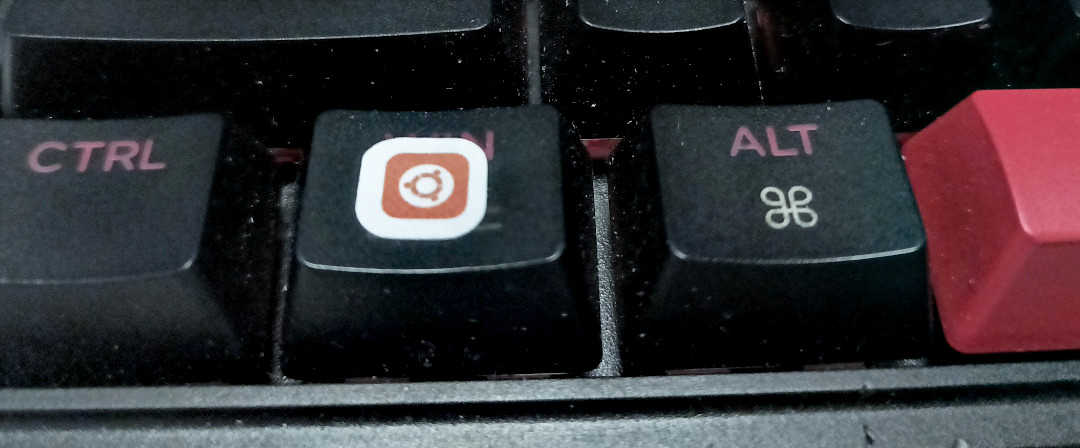
O tempo passou, e as coisas mudaram. Mudei de emprego. E de laptop como consequência. Mas levei o C3 pra ficar no trabalho, de onde tirei essa foto. Só então percebi que a tecla de menu não funcionava no Linux. E fiquei sem funcionar uns 4 meses. Até que resolvi deixar de ser preguiçoso e corrigir. Achei o artigo abaixo que falava sobre esse teclado no Linux:
Que por sua vez apontava pra outro artigo:
Eu apliquei a solução proposta pra ter o programa pelo browser funcionando pra mapear as teclas.
❯ cat /etc/udev/rules.d/99-vial.rules
KERNEL=="hidraw*", SUBSYSTEM=="hidraw", ATTRS{idVendor}=="3434", ATTRS{idProduct}=="0430", M
ODE="0660", GROUP="users", TAG+="uaccess", TAG+="udev-acl"
Reiniciei o udev:
$ udevadm trigger
$ udevadm control --reload-rules
E o resultado ao reconectar o teclado:
Feb 13 13:37:47 thinkpadL14 kernel: usb 1-2.3: new full-speed USB device number 53 using xhci
_hcd
Feb 13 13:37:47 thinkpadL14 kernel: usb 1-2.3: New USB device found, idVendor=3434, idProduct
=0430, bcdDevice= 1.00
Feb 13 13:37:47 thinkpadL14 kernel: usb 1-2.3: New USB device strings: Mfr=1, Product=2, Seri
alNumber=0
Feb 13 13:37:47 thinkpadL14 kernel: usb 1-2.3: Product: Keychron C3 Pro
Feb 13 13:37:47 thinkpadL14 kernel: usb 1-2.3: Manufacturer: Keychron
Feb 13 13:37:47 thinkpadL14 kernel: input: Keychron Keychron C3 Pro as /devices/pci0000:00/00
00:00:14.0/usb1/1-2/1-2.3/1-2.3:1.0/0003:3434:0430.001E/input/input94
Feb 13 13:37:47 thinkpadL14 kernel: hid-generic 0003:3434:0430.001E: input,hidraw1: USB HID v
1.11 Keyboard [Keychron Keychron C3 Pro] on usb-0000:00:14.0-2.3/input0
Feb 13 13:37:47 thinkpadL14 kernel: hid-generic 0003:3434:0430.001F: hiddev0,hidraw2: USB HID
 v1.11 Device [Keychron Keychron C3 Pro] on usb-0000:00:14.0-2.3/input1
Feb 13 13:37:47 thinkpadL14 kernel: input: Keychron Keychron C3 Pro Mouse as /devices/pci0000
:00/0000:00:14.0/usb1/1-2/1-2.3/1-2.3:1.2/0003:3434:0430.0020/input/input95
Feb 13 13:37:47 thinkpadL14 kernel: input: Keychron Keychron C3 Pro System Control as /device
s/pci0000:00/0000:00:14.0/usb1/1-2/1-2.3/1-2.3:1.2/0003:3434:0430.0020/input/input96
Feb 13 13:37:47 thinkpadL14 kernel: input: Keychron Keychron C3 Pro Consumer Control as /devi
ces/pci0000:00/0000:00:14.0/usb1/1-2/1-2.3/1-2.3:1.2/0003:3434:0430.0020/input/input97
Feb 13 13:37:47 silverhand kernel: input: Keychron Keychron C3 Pro Keyboard as /devices/pci0
000:00/0000:00:14.0/usb1/1-2/1-2.3/1-2.3:1.2/0003:3434:0430.0020/input/input98
Feb 13 13:37:47 thinkpadL14 kernel: hid-generic 0003:3434:0430.0020: input,hidraw3: USB HID v
1.11 Mouse [Keychron Keychron C3 Pro] on usb-0000:00:14.0-2.3/input2
Mas nada da tecla funcionar. Continuei lendo os posts até que achei esse aqui:
tl;dr: basicamente era só usar <Fn>+<Win/Ubuntu Key> pra voltar a ativar. Fácil assim. E agora tenho a tecla funcionando. E sim, eu coloquei um stickerzinho de Ubuntu em cima da tecla.
Estou assistindo agora algumas apresentações que não pude ver ao vivo durante o FOSDEM 2025. E uma dessas foi sobre como compilar Go! corretamente feita pelo Dimitri John Ledkov.
O palestrante não é programador Go! mas enpacotador pra várias distros. E conhece bem sobre quais parâmetros usar.
Eu alterei meu Makefile do programa negofetch, uma re-escrita em Go! do neofetch que estou fazendo, pra usar as dicas dele.
BINARY = negofetch

BUILD_OPTIONS = -modcacherw
#BUILD_OPTIONS += -race
BUILD_OPTIONS += -ldflags="-w -X 'main.Version=$$(git tag -l --sort taggerdate | tail -1)'"
BUILD_OPTIONS += -buildmode=pie
BUILD_OPTIONS += -tags netgo,osusergo
BUILD_OPTIONS += -trimpath

all: $(SOURCES) dependencies $(BINARY)

dependencies:
        go mod tidy

$(BINARY): $(SOURCES)
        env GOAMD64=v2 \
                CGO_ENABLED=1 \
        go build $(BUILD_OPTIONS) .
Olhando pelo govulncheck, que ele também recomenda usar, parece bom.
❯ govulncheck -mode=binary negofetch
Scanning your binary for known vulnerabilities...

No vulnerabilities found.

Share feedback at https://go.dev/s/govulncheck-feedback.
Pra quem estiver interessado, esse é o vídeo:
Page 5 of 39